
To import your snippets
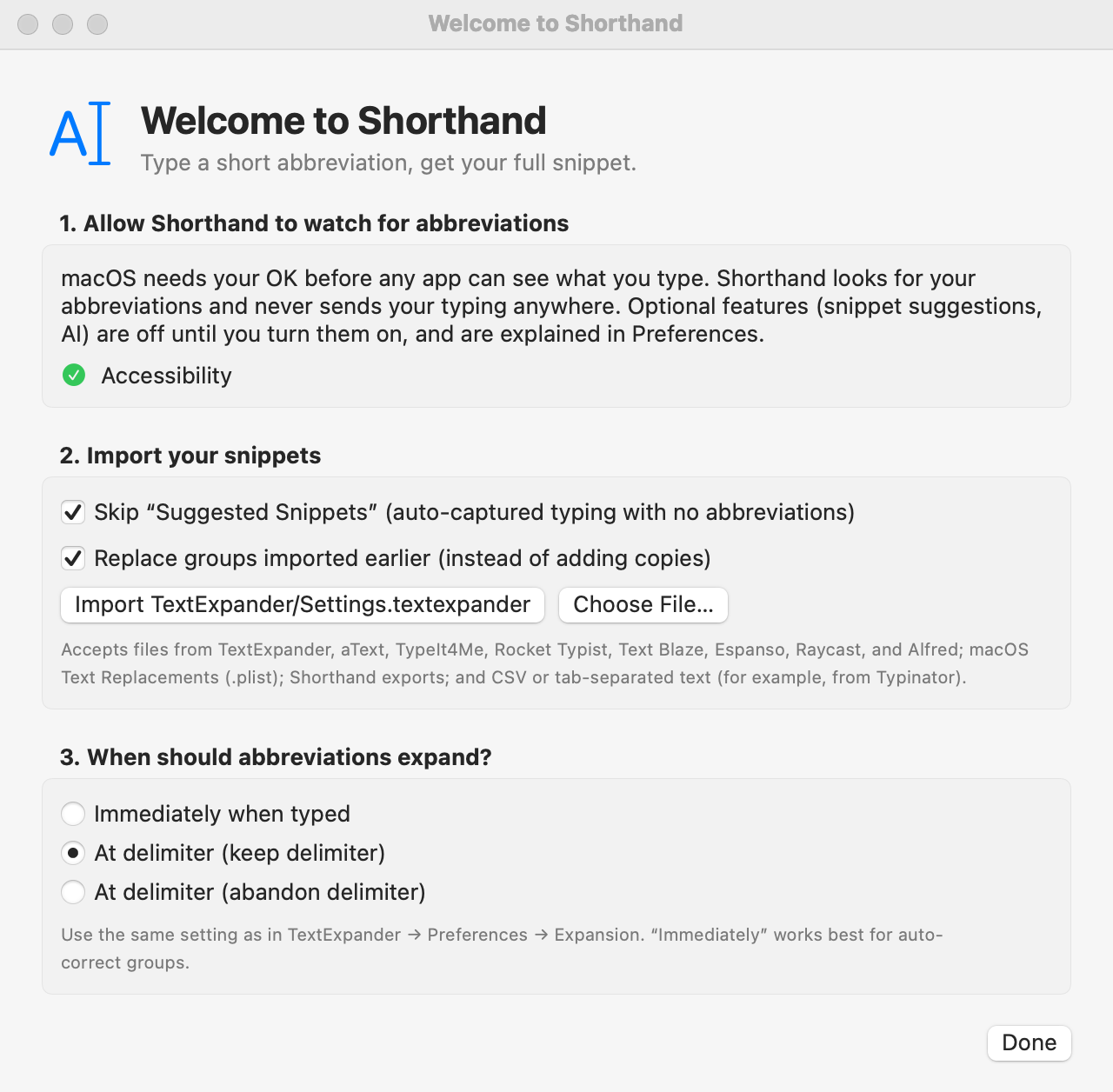
Choose File ▸ Import Snippets… (⇧⌘I). This opens the setup window; the import is one of its steps. You can also click + below the group list and choose Import Snippets….
If Shorthand finds your library, it shows a button for it, such as Import TextExpander/Settings.textexpander. Click it.
Otherwise click Choose File… and pick your file or backup folder.
A green line reports what was imported, e.g. Imported 1042 snippets in 9 groups (9 new, 0 replaced).
Quit TextExpander (or turn off its expansion) so abbreviations don’t expand twice.
Where Shorthand looks automatically
~/Dropbox/TextExpander/Settings.textexpander
~/Library/Application Support/TextExpander/Settings.textexpander
TextExpander/Settings.textexpander in iCloud Drive
What you can import
File
What it is
Settings.textexpander
Your whole library: every group and snippet.
A group .textexpander file
One exported group.
A .textexpanderbackup folder
An automatic backup; each group inside is imported.
A .txt, .csv, or .tsv file
One snippet per line: abbreviation, content, and optionally a label, separated by a Tab (preferred) or a comma. The file becomes one group named after the file.
Example text file:
;addr 12 High Street, Springfield Home address
;ph +1 555 0100 Phone
Import options
Skip “Suggested Snippets” (auto-captured typing with no abbreviations)
On by default. That group can hold thousands of phrases captured from your typing, possibly including private text, so it’s left behind unless you turn this off.
Replace groups imported earlier (instead of adding copies)
On by default. Importing the same library again updates the groups you imported before. Turn it off to add copies, named “… (imported)”.
What comes across
Abbreviations, labels, content, and use counts.
Plain-text, formatted-text, and script snippets (AppleScript, shell, JavaScript).
Each snippet’s case setting (Case Sensitive, Ignore Case, Adapt to Case of Abbreviation).
Each group’s Expand after rule, app rules, and whether it’s included in search.
Your lifetime “characters saved” total, shown in Window ▸ Statistics under Including your TextExpander history.
The example group My Snippets is removed on import if you haven’t changed it.
Importing copies your snippets; it never changes the original file. To take snippets the other way, see Exporting Your Snippets.
From other apps
Use Choose File… in the same window and pick the file (or folder) the other app exports. Each import becomes a new group.
Choose File… accepts files from all of these apps.
App
What to choose
What Shorthand converts
Espanso
A match file (.yml), or the whole match folder (one group per file). Run espanso path in Terminal to find it.
$|$ (cursor), clipboard variables, date variables (with offsets) and forms become Shorthand codes.
Raycast
The .json file from Raycast’s snippet export.
{clipboard}, {cursor}, {date}, {time}, {datetime}, {day} and {argument} (as fill-ins, with options as pop-up menus).
Alfred
A .alfredsnippets file (export a snippet collection in Alfred’s preferences).
{clipboard}, {cursor}, dates and times. The collection’s keyword prefix and suffix are added to each abbreviation.
macOS Text Replacements
In System Settings ▸ Keyboard ▸ Text Replacements, select them all and drag them to the desktop. Choose the Text Substitutions.plist file that appears.
Everything (they’re plain text).
aText
In aText, choose File ▸ Save… to save an .atext file (or use one of its automatic backups). aText’s JSON export works too.
Groups, abbreviations, labels, and text. aText’s own variables stay as text; script and picture snippets are left out. aText 3 files are read from a reverse-engineered description, so check the result.
TypeIt4Me
In TypeIt4Me, hover over a set in the sidebar, click its action button, and choose Reveal in Finder. Choose that .typeit4me file.
Dates (including date math), the clipboard (⌘), Tab, Return, and Delete keys, the cursor, and AppleScript snippets. Formatted text comes across as plain text.
Rocket Typist
Export a folder (.rtfolder) or a snippet (.rockettypist) from Rocket Typist.
Dates (with date math), text fields, option menus, the cursor, the clipboard, nested snippets, keys, and JavaScript snippets.
Text Blaze
In the Text Blaze dashboard, open Import/Export and click Export on a folder, or Export all folders. Choose the .json file.
Folders, shortcuts, labels, the clipboard, the cursor, dates (with shifts), form fields, menus, toggles, imported snippets, and keys. Formulas, conditions, and site commands stay as text.
Typinator
In Typinator, export a set as tab-separated text or CSV, then choose that file.
Dates (with date math), the clipboard, the cursor, Tab and Return, simple input fields, and other abbreviations. Functions, pop-up menus, variables, and scripts stay as text.
PhraseExpress
PhraseExpress doesn’t export its library in a format other apps can read. Copy your phrases over by hand, or export them one at a time as text.
Not available.
Any other app
Export as CSV or tab-separated text (see that app’s help), then choose the file.
The text comes across as is.
Spreadsheets can have a header row: Shorthand finds columns named like abbreviation, shortcut, keyword, or trigger, content, snippet, text, or phrase, and label or name. Without a header, the columns are abbreviation, content, label. Quoted fields can span several lines.
A % sign in snippets from other apps is kept as a percent sign (Shorthand writes it as %%). Spreadsheets are the exception: their text is used as is, so TextExpander-style codes such as %clipboard in a spreadsheet keep working. Typinator spreadsheets follow the first rule.
Codes with no Shorthand equivalent (for example Espanso shell variables or Raycast’s {uuid}) stay as text. Shorthand tells you how many, so you can find and fix them (search your snippets for the code’s name).
If the import fails
“… isn’t a snippet file Shorthand can import.” Pick Settings.textexpander, a group file or backup folder, or one of the formats in From other apps.
“Couldn’t read …” The file may still be downloading from Dropbox or iCloud. Wait and try again.
A message about missing snippet(s) in group means the library listed snippets it didn’t contain; the rest imported fine.
Related: Getting Started · Exporting Your Snippets · Macro Reference